> ## Documentation Index
> Fetch the complete documentation index at: https://docs.weavable.ai/llms.txt
> Use this file to discover all available pages before exploring further.
# MCP server overview
> What the Weavable MCP server is and how it fits into your AI stack
The Model Context Protocol (MCP) is an open standard that lets AI assistants and agents connect to external tools and data sources through a uniform interface. Weavable runs a hosted MCP server that exposes your [contexts](/product/contexts) to any MCP-compatible client.
One endpoint, one sign-in, every MCP-compatible client.
 ## How it works
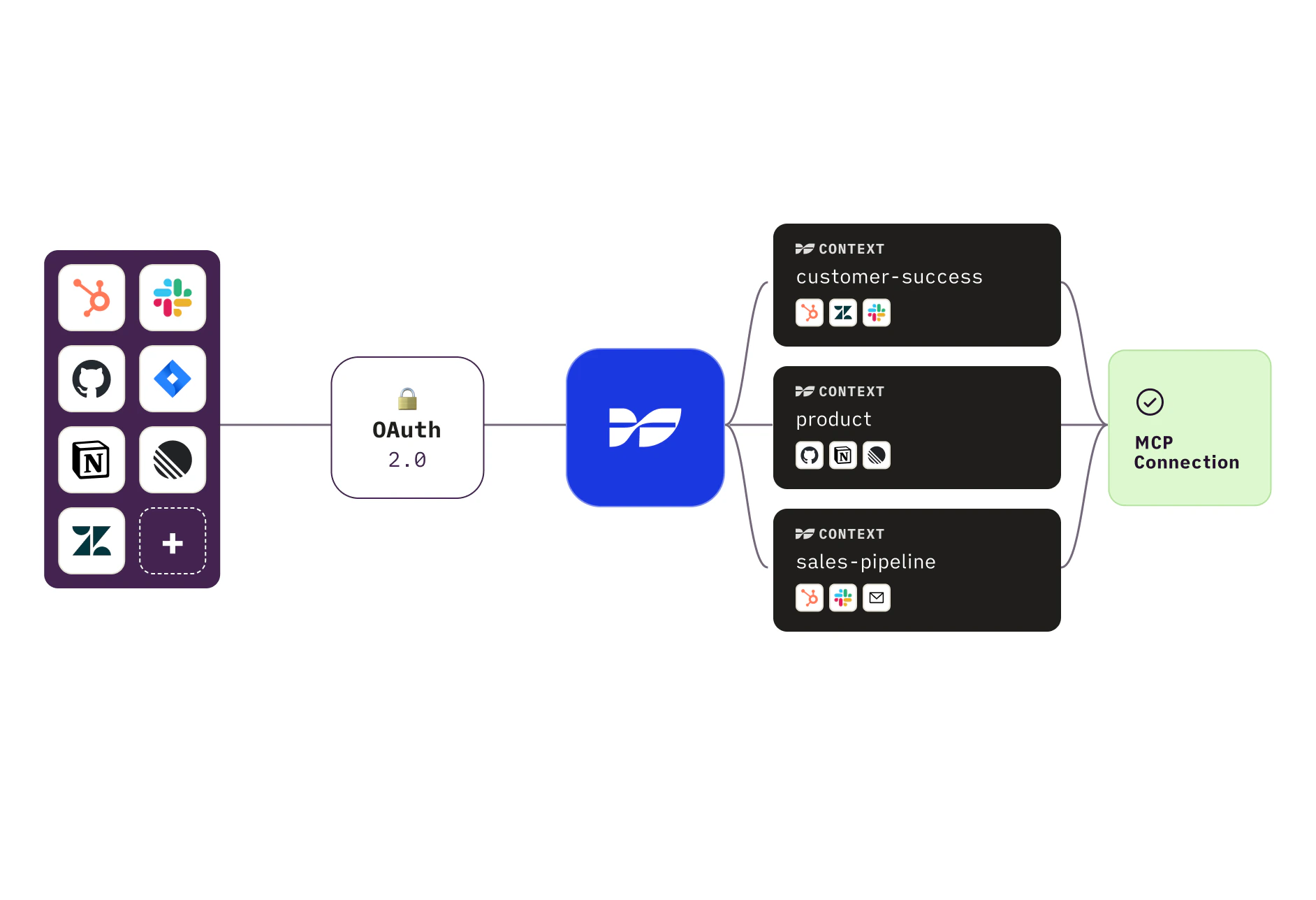
When a client calls a Weavable [tool](/mcp/tools), it doesn't get raw API data from Slack or Jira dumped at the model. The request runs through Weavable's pipeline first: your context scopes the query to the data sources you configured, related items are pulled in across tools, and results are de-noised and ranked before being returned as structured markdown the model can reason over directly.
## How it works
When a client calls a Weavable [tool](/mcp/tools), it doesn't get raw API data from Slack or Jira dumped at the model. The request runs through Weavable's pipeline first: your context scopes the query to the data sources you configured, related items are pulled in across tools, and results are de-noised and ranked before being returned as structured markdown the model can reason over directly.
 ## Authentication
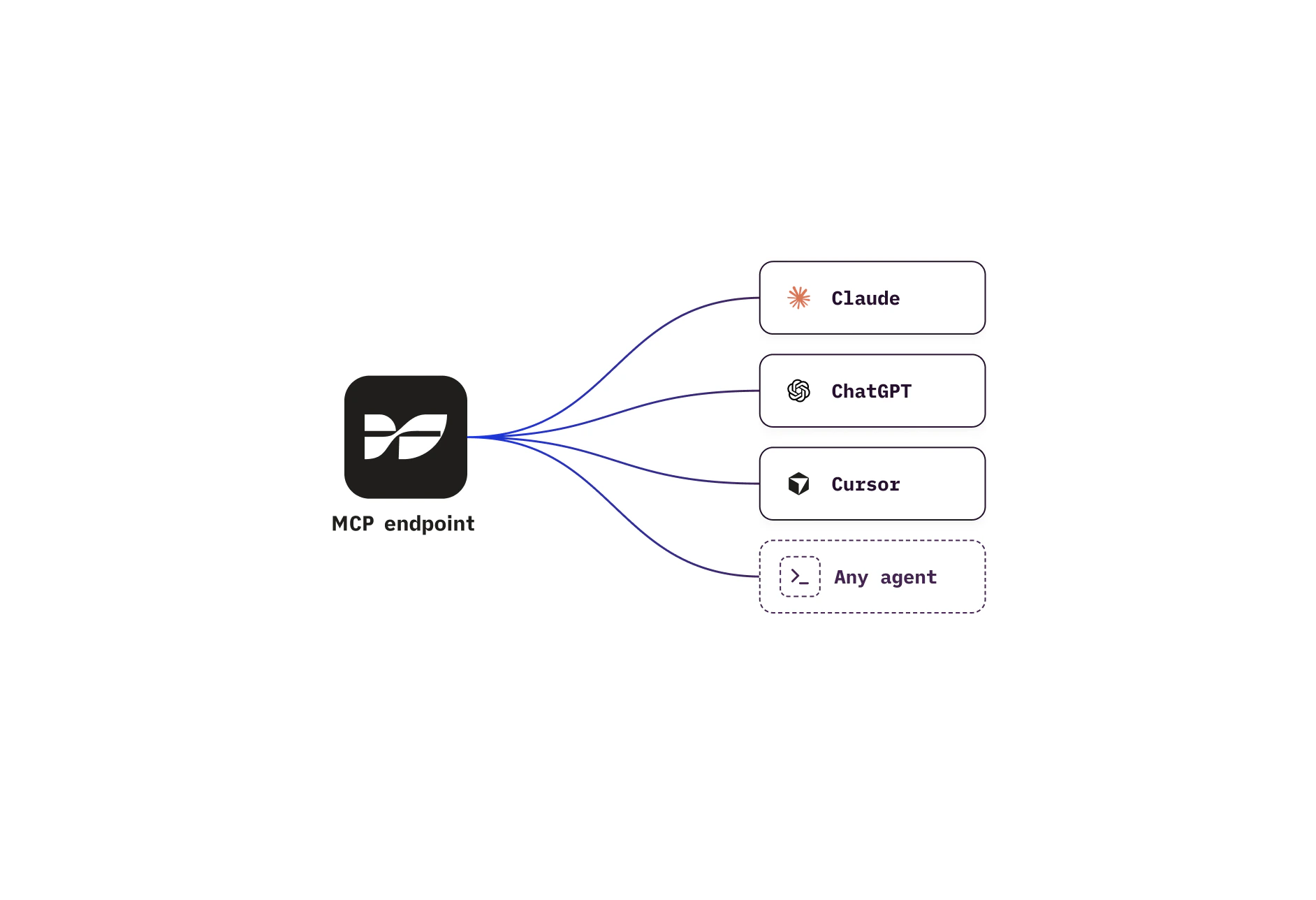
Sign in once with your Weavable account and your client stays connected — no per-tool credentials and no per-app reconfiguration. The MCP client only sees your contexts; it never gets direct access to your underlying app connections. All requests are scoped to you: tools can only return contexts you own or have been shared on, and each context only returns the data sources it was configured with.
Most clients (Claude, Claude Code, ChatGPT, VS Code, Cursor, etc.) handle sign-in automatically. See [Connect a client](/mcp/connect) for per-client setup.
## What you can do with it
Three tools, composable into most workflows:
* [`list-contexts`](/mcp/tools#list-contexts) — discover what contexts you have, their data sources, and which insights are compatible
* [`context-summary`](/mcp/tools#context-summary) — generate a written summary from a context, scoped by query and time range
* [`context-insight`](/mcp/tools#context-insight) — generate a markdown chart, table, or other visualization for a context
The full reference, including parameters and example payloads, is on the [Tool reference](/mcp/tools) page.
## Authentication
Sign in once with your Weavable account and your client stays connected — no per-tool credentials and no per-app reconfiguration. The MCP client only sees your contexts; it never gets direct access to your underlying app connections. All requests are scoped to you: tools can only return contexts you own or have been shared on, and each context only returns the data sources it was configured with.
Most clients (Claude, Claude Code, ChatGPT, VS Code, Cursor, etc.) handle sign-in automatically. See [Connect a client](/mcp/connect) for per-client setup.
## What you can do with it
Three tools, composable into most workflows:
* [`list-contexts`](/mcp/tools#list-contexts) — discover what contexts you have, their data sources, and which insights are compatible
* [`context-summary`](/mcp/tools#context-summary) — generate a written summary from a context, scoped by query and time range
* [`context-insight`](/mcp/tools#context-insight) — generate a markdown chart, table, or other visualization for a context
The full reference, including parameters and example payloads, is on the [Tool reference](/mcp/tools) page.